 Android Wear Center


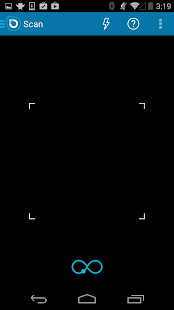
✮ The fastest QR code scanner, bar none. ✮
If you need proof, go download Optiscan QR Speed Test for FREE first!
https://play.google.com/store/apps/details?id=uk.co.airsource.android.kiji.optiscan.speedtest
SCAN
We’re not one of those other apps just using a standard processing library - we wrote our own too! This means faster detection and scanning of codes, even in difficult environments.
CREATE
Easily and quickly create QR codes for: Contacts, Emails, URLs, Plain Text, Locations, Phone numbers, SMS, Events, and Wifi details.
USE
More than a scanner. Use all the QR codes you scan right from the app - open websites, add contacts, connect to wifi networks (Compatible with Virgin Media router QR codes) and much more.
REVIEWS
"Overall, Optiscan is a really nice QR Code reader. … It’s a full-featured app that should satisfy most users." Don Reisinger, CNet
"The best QR Code scanner...it understands all the new trickier encoding types and has definitely kept up with development in QR code technology." Jeff Texeira, Hagadone
“Crunchy.”
"Recognises the QR correctly … your application is without fault - like a Kalashnikov :) Thanks!”
"By far the best out there. No hassles, no fuss. Simple to use.”
The ONLY paid for QR app recommended by The Times (London) newspaper!
FULL FEATURES
• Scan almost any QR code fast and share the content quickly
• Save specific QR codes for quick sharing - perfect for sharing your business card!
• Android Wear compatible - send QR codes straight to your watch for easier scanning!
• Keep a history of QR codes created and scanned for easy recall
• Select only the contact details you want to send, so the right people get the right information.
• Found a QR code on the web? You don't need two devices. Save the image to the photo gallery from your browser - and Optiscan will decode them for you!
Optiscan runs without a network connection, and keeps your data private. Why put up with anything less?
** We want your feedback! **
We're always working on the next update to keep you happy and always look to include the most popular new features as requested by you.
Why do we need all those permissions?
* We need to take pictures and videos in order to scan codes.
* We need flashlight control to help you scan QR codes in very dark environments.
* We need the ability to use your network to take you to URLs from scanned QR codes using our internal browser.
* We need your location if you want to create a QR code for your current location.
* We need permission to directly call phone numbers as some QR codes contain phone numbers that you can optionally dial from within Optiscan. We don't make phone calls without your permission.
* We need permission to send SMS messages as some QR codes contain SMS information that you can optionally send from within Optiscan. We don't send text messages without your permission.
* We need access to your contacts if you scan a QR code that contains contact information. If that contact information is identical to a contact that already exists, we may need to modify that contact.
* We need access to your Wi-Fi settings as some QR codes contain Wi-Fi access point login information and we can use that to connect you directly to the access point.
✮ Der schnellste QR-Code-Scanner, bar none. ✮
Wenn Sie einen Beweis brauchen, gehen Sie downloaden Optiscan QR Speed Test GRATIS zuerst!
https://play.google.com/store/apps/details?id=uk.co.airsource.android.kiji.optiscan.speedtest
SCAN
Wir sind nicht einer von denen andere Anwendungen nur mit einem Standard-Verarbeitungsbibliothek - wir schrieben unsere eigenen auch! Das bedeutet schnellere Erkennung und Scannen der Codes, auch in schwierigen Umgebungen.
CREATE
Leicht und schnell zu erstellen QR-Codes für: Kontakte, E-Mails, URLs, Plain Text, Standorte, Telefonnummern, SMS, Events und Wifi Details.
USE
Mehr als ein Scanner. Verwenden Sie alle QR-Codes, die Sie direkt aus der App scannen - Websites öffnen, Kontakte hinzufügen, eine Verbindung zu Wi-Fi-Netzwerke (kompatibel mit Virgin Media Router QR-Codes) und vieles mehr.
MEINUNGEN
"Insgesamt ist eine wirklich schöne Optiscan QR-Code-Reader .... Es ist eine voll funktionsfähige Anwendung, die die meisten Anwender zufrieden stellen sollte." Don Reisinger, CNet
"Die beste QR Code Scanner ... es alle neuen schwieriger Kodierungsarten versteht und hat auf jeden Fall mit der Entwicklung in QR-Code-Technologie gehalten." Jeff Texeira, Hagadone
"Crunchy".
"Erkennt die QR richtig ... Ihre Anwendung ist ohne Fehler - wie eine Kalaschnikow :) Danke"
"Mit Abstand das beste gibt. Kein Ärger, kein Stress. Einfach zu bedienen."
Die NUR für QR-App von The Times (London) Zeitung empfohlen bezahlt!
FULL FEATURES
• Scannen fast jeder QR-Code schnell und schnell gemeinsam den Inhalt
• Speichern spezifischen QR-Codes für schnellen Austausch - perfekt für Sie Ihre Visitenkarte!
• Tragen Sie Android-kompatibel - senden Sie QR-Codes direkt auf Ihre Uhr für einfacher Scannen!
• Halten Sie eine Geschichte von QR-Codes erstellt und zur einfachen Abrufbarkeit gescannt
• Wählen Sie nur die Kontaktdaten, die Sie senden wollen, so dass die richtigen Leute die richtigen Informationen zu erhalten.
• Gefunden einen QR-Code auf dem Web? Sie müssen nicht zwei Geräte. Speichern Sie das Bild, um die Fotogalerie von Ihrem Browser - und Optiscan sie für Sie zu entschlüsseln!
Optiscan läuft ohne Netzwerkverbindung und hält Ihre Daten privat. Warum sollten Sie sich mit weniger?
** Wir möchten Ihr Feedback! **
Wir sind immer auf der Arbeit an dem nächsten Update, um Sie glücklich und immer schauen, um die beliebtesten neuen Funktionen gehören, wie von Ihnen gefordert.
Warum müssen wir alle diese Berechtigungen müssen?
* Wir müssen die Bilder und Videos, um die Codes scannen zu nehmen.
* Wir benötigen Taschenlampe Kontrolle, damit Sie QR-Codes in sehr dunklen Umgebungen zu scannen.
* Wir brauchen die Möglichkeit, Ihr Netzwerk nutzen, um Sie mit unserem internen Browser, um URLs aus gescannten QR-Codes zu nehmen.
* Wir brauchen Ihre Lage, wenn Sie einen QR-Code für Ihren aktuellen Standort erstellen möchten.
* Wir brauchen die Erlaubnis, Telefonnummern direkt anrufen, da einige QR-Codes Telefonnummern, die Sie wahlweise von innen Optiscan Wahl enthalten. Wir wissen nicht telefonieren ohne Ihre Erlaubnis.
* Wir brauchen die Erlaubnis, SMS-Nachrichten, da einige QR-Codes enthalten, SMS-Informationen, die Sie senden können optional aus Optiscan senden. Wir haben keine SMS-Nachrichten ohne Ihre Zustimmung versenden.
* Wir benötigen Zugriff auf Ihre Kontakte, wenn Sie einen QR-Code, der Kontaktinformationen enthält scannen. Wenn die Kontaktinformationen identisch zu einem Kontakt, der bereits vorhanden ist, müssen wir zu, dass der Kontakt zu modifizieren.
* Wir benötigen Zugang zu Ihrem WLAN-Einstellungen wie einige QR-Codes enthalten Wi-Fi-Zugangspunkt Login-Daten und das können wir nutzen, um Ihnen eine direkte Verbindung zum Access Point.